




Third-party cookies are dying, and they’re not doing so slowly. Google Chrome just entered the final phase of eliminating cookies, and that browser dominates 63% of the global browser market share. By the end of 2025, third-party cookies won’t just be unreliable; they’ll disappear completely.
Cookies have been the backbone of digital advertising, user tracking, attribution, and personalization for more than the last couple of decades, and their removal demands that developers rethink several of the most important features in the web experience. Nor is this shift optional: when Chrome closes that door, every business-from small SaaS tools to billion-dollar ad networks-needs an answer.
Welcome to the Cookiepocalypse
But don’t panic: Google has already drafted a replacement, and its name is The Privacy Sandbox. In this guide, developers will learn all about the changes, what updates to make in your codebase today, and how to future-proof your tracking, analytics, and personalization without violating user trust.
Why the Cookiepocalypse is happening
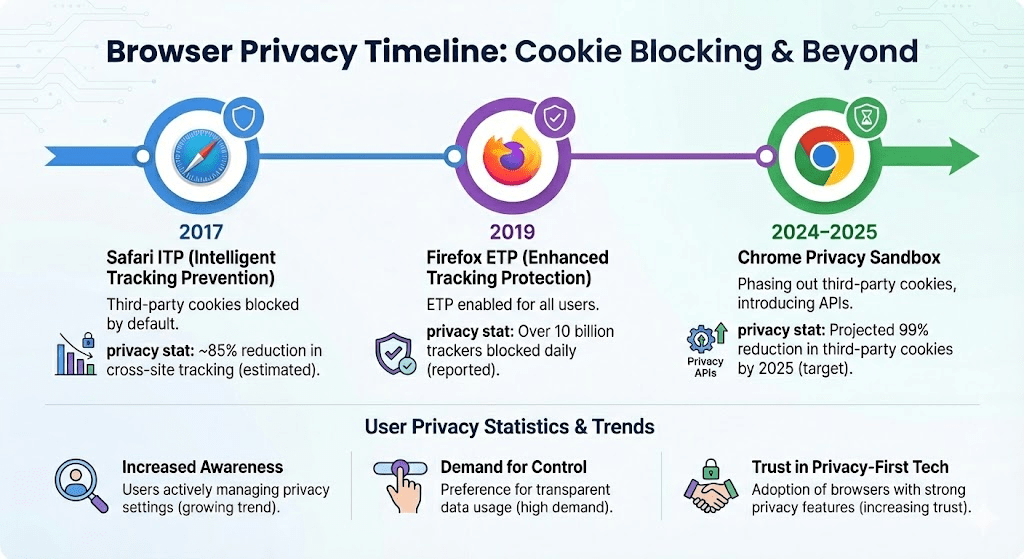
The need for a ‘privacy-first’ web has increased: users are more aware, regulators are stricter, and browsers are laying down policies.
Following are a few statistics that indicate the change.
79% of users are concerned about companies tracking their online behavior.
60% of consumers say they’d stop buying from a brand that misuses data.
Third-party cookies have been blocked by Safari and Firefox for years.
GDPR fines globally reached well over $4.2 billion since enforcement began.
Google had little choice. The open web was in danger of a crisis of trust.
Introducing the Privacy Sandbox by Google
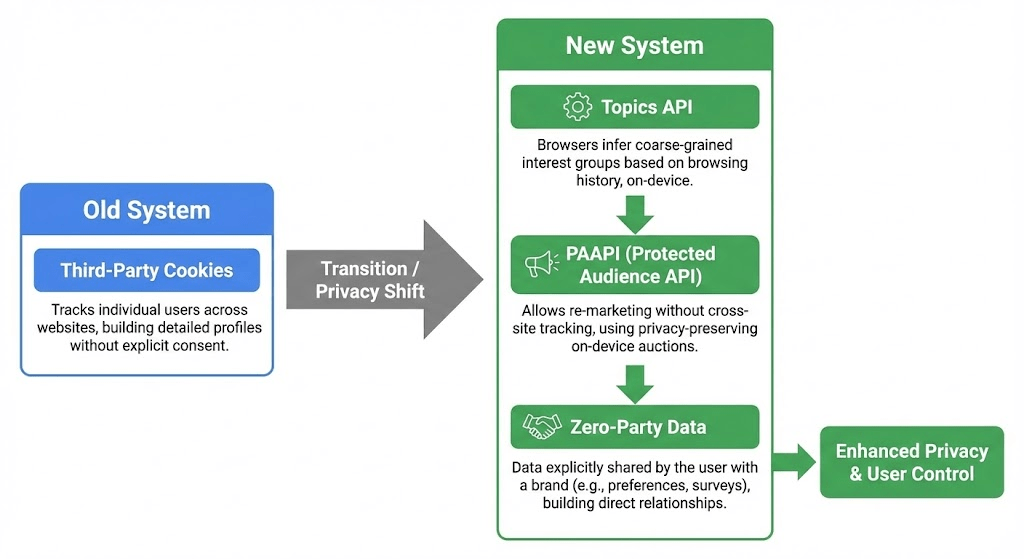
To avoid breaking the entire advertising ecosystem, Google devised the Privacy Sandbox-a set of APIs that can enable targeting, measurement, and personalization without exposing personal data directly. Instead of tracking users, most of that logic is done by the browser itself, which only shares aggregated signals that are privacy-safe.
The Sandbox contains quite a number of APIs, but, in general, a developer has to concern himself/herself with:
– Topics API: Instead of interest-based ad tracking
PAAPI: Protected Audience API; replaces remarketing
– Attribution Reporting API (replaces cookie-based conversions)
We’ll focus on the first two, since those are likely to affect most codebases.
How the Topics API Actually Works
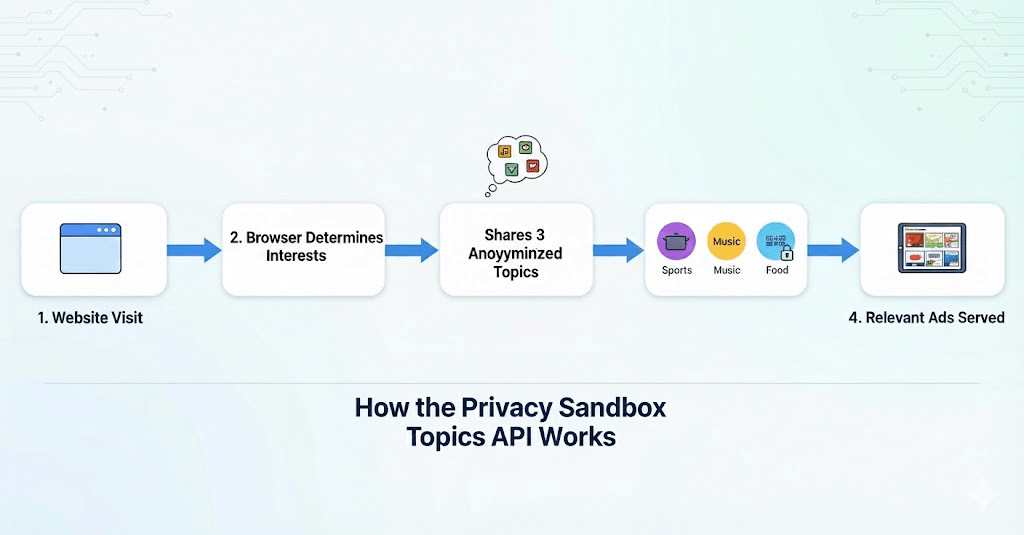
The Topics API replaces cookie-based tracking with a browser-controlled interest classifier. Instead of letting advertisers collect browsing history, Chrome determines what topics the user might find interesting.
Here is how this works in simple steps:
1. Chrome identifies broad categories, like “Fitness” or “Travel.” The browser picks a few interests from a list of 469 pre-defined topics based on recent browsing—far less invasive than collecting URLs.
2. Only 3 topics are shared per site, per week. It prevents fingerprinting – or sensitive inferences.
3. Information never involves personal identifiers. Not user-specific history. Not third-party cookie IDs. Not cross-site tracking.
4. Developers can request topics using a simple JavaScript call:
document.browsingTopics().then(topics => {
console.log(topics);
});
Each object has a topic ID and taxonomy version-no personally identifying information.
5. Since the browser changes topics every week, the profile, too, evolves over time, reflecting new behavior rather than storing long-term identities.
This means giving something of value to advertisers, but core protection for users.
Or, put another way: Your code receives interests, not identities.
What About Remarketing? Introducing the Protected Audience API
Of all the capabilities that cookies enable, the most difficult to replace is remarketing-or showing ads to users who visited your site. Google’s solution for this is called the Protected Audience API, or PAAPI.
Here’s how it works:
It keeps these lists locally in the browser, not on servers.
A user visits your site, and you make an API call adding them to an “interest group.”
Ad auctions run the bidding logic in the browser of the user’s device.
No data that identifies a particular user ever makes it to the publisher.
Advertisers never see personal identifiers.
It is blind remarketing.
Example (simplified):
navigator.joinAdInterestGroup({
name: “abandoned-cart-user”,
owner: “https://yourdomain.com”,
ads: [
{renderUrl: “https://yourdomain.com/ad1”},
]
}, 30 * 24 * 60 * 60);
This stores an interest group for 30 days, locally and not in the cloud.
Biggest change: Developers no longer manage remarketing data. Browsers do.
Zero-Party Data: Most Valuable Data in the Cookieless World
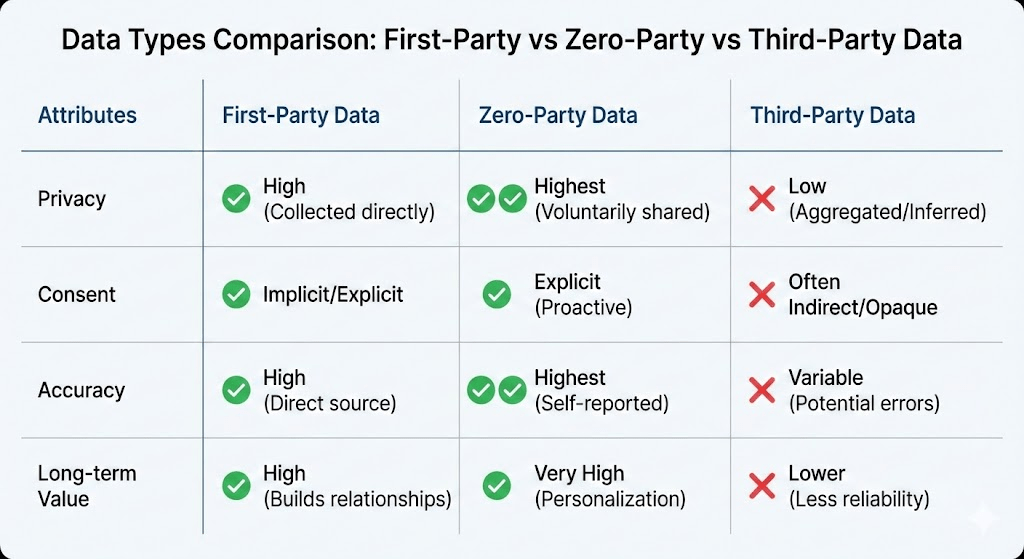
This shift pushes companies toward Zero-Party Data: information the users willingly share.
Examples include:
– Preference centers
Answers to Quiz
– Newsletter subscriptions
– Personalization options
– Customer profile surveys
Loyalty program data People don’t want to be tracked silently. However, they are willing to share as long as they get value in return, and stats confirm it:
• 80% of customers intend to share data in order to get more relevant experiences.
63% prefer brands that can enable transparent data control.
Zero-party data delivers 2X higher engagement rates than third-party data. This is clean, consent-driven, regulation-friendly data. It’s also key to future personalization frameworks.
Checklist: Audit Your Current Cookie Usage Even if you aren’t running ads
Your website very likely relies upon cookies in ways that you have forgotten. Here’s your immediate audit list:
1. Identify all third-party scripts. This means checking Tag Manager, analytics and pixel integrations, heatmaps, chat widgets, and CRM embeds.
2. Map which cookies each script sets. Oftentimes, many scripts sneak in tracking cookies even when unused.
3. Remove legacy scripts: Old Facebook pixels, A/B testing tools, and affiliate trackers that are not needed anymore.
4. Update consent banner: Your cookie notice needs to reflect the tracking that remains.
5. Use server-side tracking where possible. It reduces issues on the client side and is more accurate post-cookie.
6. Prepare for Topics/PAAPI combination. Start the testing with Chrome flags or documentation of Google AdTech.
7. Convert dark data to Zero-Party Data. Replace tracking with questions, onboarding flows, and preference forms.
The following list cleans up your codebase before cookies are finally phased out.
What Developers Need to Change in Their Codebase Today
The hard truth is that if your stack relies on third-party cookies, then it’s outdated already. You have to begin migrating now:
1. Replace cookie-based tracking with Privacy Sandbox APIs starting with the Topics API for interest-based signals.
2. Move to server-side tagging: Platforms like Google Tag Manager Server-Side reduce client-side dependencies.
3. Limit dependency on fingerprinting workarounds, as these are highly regulated.
4. Build or integrate Zero-Party Data flows like preference centers, custom surveys, and interactive onboarding.
5. Refresh your analytics attribution methods: the Attribution Reporting API has privacy-safe conversions.
6. Test your new remarketing strategies. The Protected Audience API is your new resource.
7. Document all data flows. Privacy audits will be commonplace. That means much more than a tweak. It’s a fundamental shift in how the web perceives users.
The Cookiepocalypse Isn’t the End-It’s the Reset We Needed For years
Developers accepted tracking as a necessary evil. But users never agreed to be followed across the internet. The privacy crisis was inevitable—and the Cookiepocalypse is the reset the industry needed.
The Privacy Sandbox is not perfect, but it is a step toward a healthier, more ethical web: one that respects user data rather than exploits it. Now, as a developer, you can build better systems: Cleaner. More transparent. More privacy-aware. And yes-still highly effective.
Third-party cookies are dead. But modern privacy-safe tracking is very much alive. Developers who adapt quickly will lead the next era of the web.